
Quick answer: A car wash website costs between $500 and $50,000+ in 2026. A DIY website usually costs around $0–$600+ per year. A basic professional website for a single location typically starts around $1,000–$5,000. A custom business website with stronger design and local SEO can cost $2,500–$10,000+. A booking or membership-enabled website with online payments and recurring subscriptions typically costs $5,000–$20,000+. An advanced website with customer accounts, integrations, and multiple locations can reach $10,000–$30,000+, while a full car wash marketplace or multi-location platform with provider dashboards can reach $20,000–$50,000+. Annual maintenance generally adds another 15–25% of the original development cost.
If you own a car wash, auto detailing business, or mobile car wash service, or you’re planning a car wash marketplace, a professional website makes it easier for customers to find you, understand your services, compare packages, and book. But one question usually comes first: how much does a car wash website cost in 2026?
The answer depends on what you want the website to do. A simple business website with services, prices, opening hours, location, photos, and contact details may cost a few hundred to a few thousand dollars. A custom website with online booking, memberships, payments, customer accounts, multiple locations, integrations, and local SEO can require a much larger budget.
Market Size Overview:
The global web development services market was valued at $80.6 billion in 2025 and is estimated to grow from $87.75 billion in 2026 to $134.17 billion by 2031, representing an 8.87% CAGR. Small and medium-sized businesses are among the fastest-growing buyers, expanding at a 10.85% CAGR as low-cost SaaS toolkits and pay-as-you-go cloud hosting reduce upfront investment. Asia-Pacific is the fastest-growing region at a 17.05% CAGR.
Planning your car wash business? Start by understanding the app investment as well. Read our guide on How Much Does a Car Wash App Development Cost for a detailed cost breakdown and features.
In other words, cost is influenced more by functionality and project scope than by the number of pages. This guide breaks down pricing, development options, features, SEO, maintenance, and the main factors to consider before you start.
Car Wash Website Cost in 2026: The Complete Pricing Guide
| Website Type | Approximate Cost | Suitable For |
|---|---|---|
| DIY website | $0–$600+ per year | Very small or new businesses |
| Basic professional website | $1,000–$5,000 | Single-location car washes |
| Custom business website | $2,500–$10,000+ | Established businesses |
| Booking or membership website | $5,000–$20,000+ | Online booking or subscriptions |
| Advanced car wash website | $10,000–$30,000+ | Payments, accounts, integrations, multiple locations |
| Multi-location or marketplace platform | $20,000–$50,000+ | Chains, franchises, multi-provider platforms |
These are planning ranges rather than fixed prices. Your final quote can change based on design, functionality, integrations, content, SEO requirements, number of locations, and ongoing support.
Real example: a five-page website with a custom booking system can require more development work than a simple 15-page informational site. That’s why comparing only page counts can be misleading.
The better question is not “What is the cheapest website I can build?” but “What does my customer actually need to do on my website?”
If customers only need your services, prices, location, hours, and phone number, you probably don’t need a complex platform. If they need to book, pay online, manage a membership, or interact with different providers, the website becomes considerably more involved.
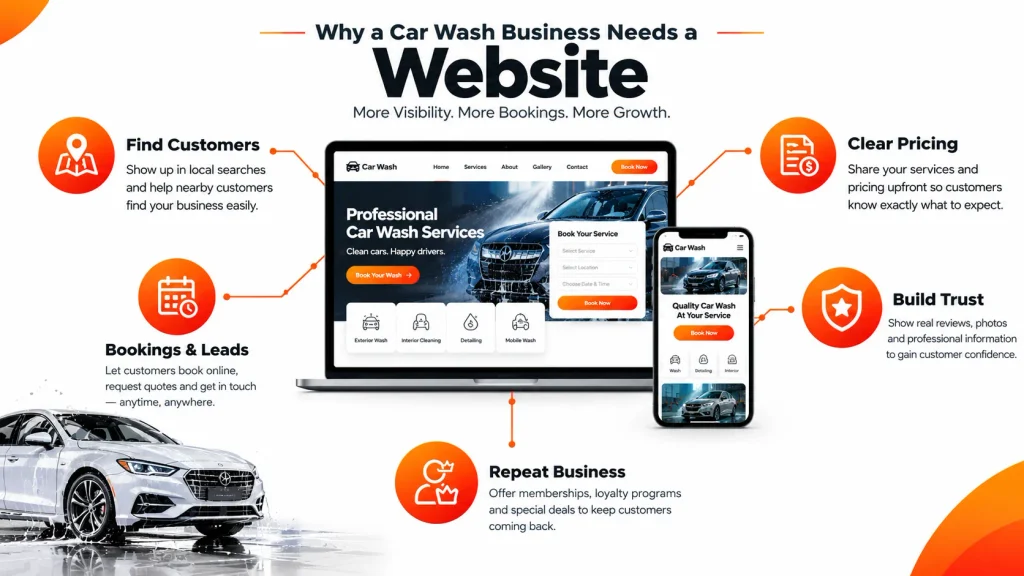
Why Does a Car Wash Business Need a Website?
A car wash website should be more than an online brochure. Customers want quick answers: How much does it cost? What’s included? Where are you located? Are you open? Can I book online? Do you offer memberships?
Help customers find your business
People search for “car wash near me,” “mobile car wash,” or “car detailing in [city].” A mobile-friendly site with local SEO helps you appear when vehicle owners are actively looking.
Make pricing easy to understand
Show the service name, price or starting price, what’s included, add-ons, vehicle restrictions, estimated duration, and the next step. Clear pricing reduces confusion and saves customers a phone call.
Generate calls, bookings, and leads
Guide visitors toward a clear action such as Book a Wash, View Packages, Buy a Membership, Get Directions, Call Now, or Request a Quote.
Build trust
Customers are trusting you with their vehicle. Reviews, testimonials, real photos, before-and-after images, clear policies, and easy-to-find contact details make new visitors more comfortable.
Support repeat business
Unlimited washes, prepaid packages, gift cards, and memberships improve retention, especially when they’re easy to understand and purchase online.
What Type of Car Wash Website Do You Need?
Single-Location Car Wash Website
This is the simplest model and often the right starting point. It may include a homepage, services, pricing, about section, opening hours, Google Maps location, contact form, click-to-call button, reviews, photo gallery, and basic SEO. The focus is to help people discover the car wash, understand the services, and take action quickly.
Mobile Car Wash Website
A mobile car wash travels to the customer’s home or office, so its website needs more than standard business information. Depending on the model, it may require location detection, service area management, provider availability, scheduling, online payments, notifications, reviews, and provider profiles.

The more real-time information the system manages, the higher the development cost.
Car Wash Marketplace
A marketplace connects customers with multiple car wash professionals. It generally has three sides:
- Customers create accounts, compare providers, view prices and reviews, book and pay online, reschedule or cancel, and leave reviews.
- Providers create profiles, add services and prices, define service areas, manage availability, accept bookings, and track earnings.
- Admins approve providers, manage bookings and payments, set commissions, handle disputes, run promotions, and monitor analytics.
This is a much larger scope than a standard business website because it needs customer and provider profiles, bookings, payments, dashboards, and administrative controls.
Car Wash Website Development Cost: 8 Factors That Affect Price
Two websites with the same number of pages can have completely different budgets. The main drivers are functionality, customization, integrations, and the work happening behind the scenes.
1. Design and User Experience
Template-based websites cost less because much of the layout already exists. Custom design requires:
- Planning
- Wireframing
- Visual design
- Revisions
- Development
- Testing
It may include:
- Mobile-first layouts
- Custom branding
- Package comparisons
- Tailored booking flows
Good design isn’t just about looks; it should help customers move from service discovery to booking with minimal friction.
2. Number of Pages
A small business may only need:
- Home
- About
- Services
- Pricing
- Contact
- Location pages
A larger company may add:
- Membership information
- Gift cards
- Fleet services
- FAQs
- Promotions
- A blog
Still, page count shouldn’t be the main pricing factor. A simple 20-page site can be easier to build than a five-page site with custom booking, subscriptions, and payments.
3. Online Booking
A contact form is simple. A complete online booking system is not. It may need:
- Service selection
- Time slots
- Vehicle details
- Customer accounts
- Availability management
- Confirmations
- Reminders
- Rescheduling
- Payments
Connecting to an existing booking platform can reduce custom work, while a fully custom system increases both cost and timeline.
4. Memberships and Subscriptions
Unlimited membership programs are valuable but add complexity. They may need:
- Monthly or annual plans
- Recurring payments
- Vehicle information
- Subscription management
- Upgrades
- Cancellations
- Receipts
- Renewal notifications
There’s a major difference between a page that explains membership plans and a website that actually manages recurring subscriptions.
5. Payment Integration
Online payments let customers buy wash packages, detailing services, memberships, gift cards, or deposits directly through the website. The system may also need to handle:
- Failed payments
- Refunds
- Receipts
- Recurring billing
Payment processing fees are normally separate from development cost. Payment gateways such as Stripe, Square, or PayPal need proper integration and testing. There can also be security checks and monthly fees in addition to transaction charges.
6. Third-Party Integrations
A car wash website may connect with:
- Booking software
- Payment gateways
- CRM and POS systems
- Membership software
- Email and SMS tools
- Analytics
Ready-made integrations are manageable, but custom API integration takes more planning and testing, especially when systems exchange booking, customer, payment, or availability data.
7. Number of Locations
Multiple locations may need:
- A location finder
- Individual location pages
- Location-specific hours, services, and pricing
- Reviews
- Local SEO content
- Centralized content management, so staff don’t edit every location manually
More locations mean more content, functionality, and maintenance.
8. SEO Requirements
Initial SEO may include:
- Keyword research
- Page titles
- Meta descriptions
- SEO-friendly URLs
- Internal linking
- Image optimization
- Local landing pages
- Structured data
- Technical SEO
Treat SEO as part of the website strategy rather than something added later. However, SEO does not guarantee a specific Google ranking, since visibility depends on relevance, competition, website quality, authority, and local signals.
Let’s Build Your Car Wash Website
From simple business websites to booking and membership platforms, we can help you build a website that fits your needs.
Car Wash Website Cost Breakdown: DIY vs Freelancer vs Agency
DIY Website
A website builder or WordPress setup is usually the lowest-cost option. You may pay for a domain, hosting, theme, plugins, business email, booking software, and payment processing. The financial cost is low, but you invest your own time in design, content, security, updates, and SEO. For a small single-location business this can be enough, though you may outgrow it if you later need custom booking, memberships, or complex integrations.
WordPress Website
WordPress lets you start with a template and add functionality as the business grows.
| Item | Approximate Budget |
|---|---|
| Domain | $10–$30/year |
| Hosting | $60–$250/year |
| Premium theme | $30–$100+ |
| Plugins | $0–$300+/year |
| Booking software | $0–$1,000+/year |
| Initial setup | $0–$1,500+ |
Actual costs vary by provider, software choice, traffic, and requirements.
Freelancer
A freelancer offers more customization than DIY without an agency’s structure. Projects often fall around $1,000–$5,000, though pricing varies considerably. A freelancer may handle setup, custom design, mobile responsiveness, service pages, contact forms, booking integration, basic SEO, analytics, and launch. When comparing quotes, check whether hosting, content, revisions, SEO, integrations, and post-launch support are included.
Professional Web Agency
Agencies may charge around $3,000–$15,000+, with advanced custom projects going higher. Pricing may cover UX/UI design, development, project management, SEO, content, quality assurance, and support. This makes sense for advanced booking, memberships, multiple locations, CRM/POS integrations, or scalable platforms. Ask for a clear cost breakdown and written scope of work rather than comparing headline numbers.
Essential Features of a Car Wash Website
Not every car wash needs every feature. Start with what supports your actual customer journey.
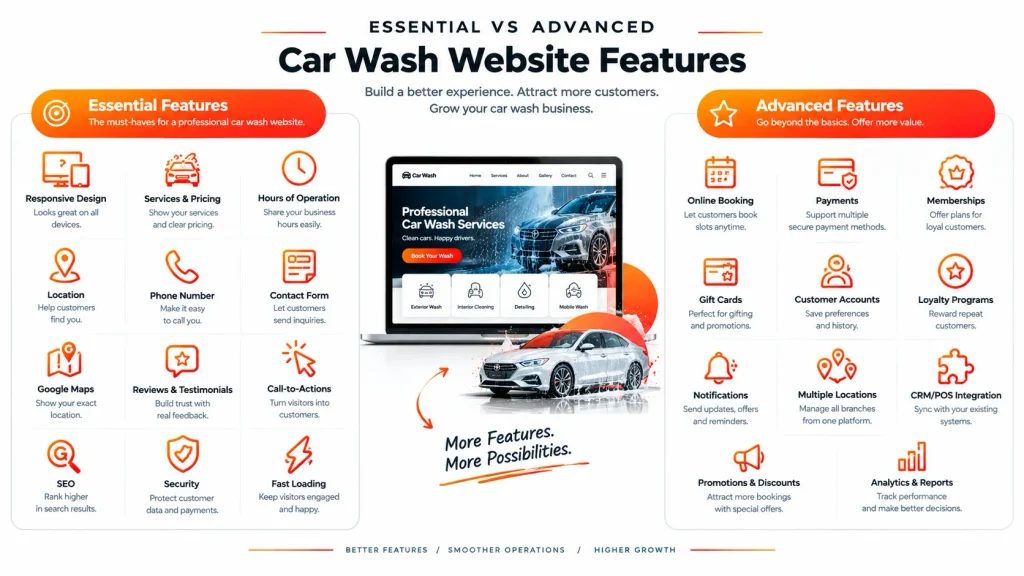
Essential features:
- Responsive design
- Services and pricing
- Business hours
- Location and directions
- Phone number
- Contact form
- Google Maps
- Customer reviews
- Clear calls-to-action
- Basic SEO
- SSL/security
- Fast-loading pages
Advanced features (as needed):
- Online booking
- Online payments
- Memberships
- Gift cards
- Customer accounts
- Loyalty programs
- SMS and email notifications
- Multiple locations
- Fleet services
- CRM/POS integration
- Promotions
- Advanced analytics
For a marketplace or on-demand service, you’ll also need:
- Provider and customer profiles
- Service areas
- Availability management
- Commissions
- An admin dashboard
The goal isn’t to create the biggest website possible. It’s to build an easy-to-use one that solves your customers’ real problems.
How to Build a Car Wash Website – 11 Ways Step-by-Step Guideline
Understand your target customers
Your audience could include local vehicle owners, busy professionals, rideshare drivers, fleet operators, or dealerships. Identify the main problem you’re solving, whether it’s convenience, faster booking, clear pricing, mobile detailing, or easy membership management. This shapes your structure, content, and budget.
Research competitors
Review competing sites for services, pricing, booking experience, memberships, reviews, and mobile experience. Look for gaps you can fill. If competitors make customers call for prices, clear pricing can set you apart.
Choose your business model
Options include direct service, a commission marketplace, subscriptions, featured listings, and B2B or fleet services. Your model should shape the website architecture from the beginning.
Choose custom development or ready-made software
Custom development gives more control over design, workflows, and integrations. Ready-made software offers pre-built features and reduces initial work. The right choice depends on how unique your needs are, your budget, and expected growth.
Plan the structure
A traditional site may include Home, About, Services, Pricing, Locations, Memberships, Reviews, FAQ, Contact, and Blog. A marketplace also needs provider profiles, customer and provider dashboards, and booking history.
Design for mobile users
Many customers will find you on a smartphone. Make it easy to call, get directions, view prices, book, and pay, using simple navigation, short forms, readable text, and tap-friendly buttons.
Add services and pricing
Tell customers exactly what they receive. For example: “Premium Interior Detail — vacuuming, dashboard cleaning, seat cleaning, carpet treatment, and interior wipe-down. Approximately X minutes. Starting at $XX. Book Now.” That’s far more useful than “We provide premium car detailing,” and it helps search engines understand each service.
Add booking and payments
A straightforward flow: Choose Service → Select Vehicle → Choose Date → Choose Time → Enter Details → Pay → Confirm. Mobile businesses also need customer location and provider availability. A marketplace must additionally manage commissions, provider payouts, refunds, cancellations, and disputes.
Add reviews and trust signals
Marketplace provider profiles can include photos, services, prices, service area, ratings, reviews, and before-and-after photos. Traditional sites can use testimonials, real photos, certifications, clear policies, and contact information.
Add membership and loyalty features
Options include basic, unlimited, premium, and fleet plans, plus loyalty points, referral rewards, discount codes, and seasonal promotions. Add them when they support your business model, not simply because they’re available.
Test everything before launch
Test mobile responsiveness, forms, booking, payments, cancellations, membership signup, notifications, maps, page speed, broken links, security, and admin functions. A site can look excellent and still fail customers if booking breaks or a contact form never reaches you.
Need a Custom Car Wash Website?
Share your requirements with us, and our team will help you plan the right design, features, and development approach.
How to Optimize a Car Wash Website for SEO
Target local search intent
Relevant searches include “car wash in [city],” “mobile car wash in [city],” “car detailing in [city],” and “unlimited car wash [city].” Use these phrases where they genuinely fit, and avoid repeating the same keyword in every paragraph.
Create useful location pages
Include the address, services, hours, phone number, directions, pricing, photos, and booking options. Avoid creating dozens of near-identical pages where only the city name changes.
Optimize core pages
Each important page needs a clear title, useful headings, a descriptive URL, relevant content, internal links, optimized images, and an obvious call-to-action. The homepage should explain what you offer, service pages should explain individual services, pricing pages should make costs clear, and location pages should help customers find you.
Support your Google Business Profile
Keep your business name, address, phone number, and hours consistent across your website and local listings.
Focus on people-first content
Answer the questions customers actually ask: How much does a wash cost? How long does detailing take? Do you offer memberships? Can I book online? Do you come to my location? What if I need to cancel?
How Much Does It Cost to Maintain a Car Wash Website?
Website costs don’t end when the site goes live. Ongoing expenses may include:
| Expense | Typical Consideration |
|---|---|
| Domain | Usually annual |
| Hosting | Monthly or annual |
| Security | Ongoing |
| Maintenance | Monthly or hourly |
| SEO | Depends on scope |
| Content updates | As needed |
| Booking software | Depends on provider |
| Payment processing | Per transaction |
| Third-party integrations | Depends on platform |
| Advertising | Separate marketing budget |
You’ll also need to update prices, hours, holiday schedules, services, membership plans, promotions, and photos. A simple site may need only occasional updates, while one connected to payments, booking, or memberships needs more regular attention.
Some businesses budget around 15–25% of the original development cost per year for maintenance, but this is only a guideline. Actual cost depends on complexity, software stack, traffic, security requirements, and support level.
Ongoing and Additional Website Expenses
Before approving a proposal, ask about expenses that may not appear in the headline price.
- Domain: usually has an annual renewal fee.
- Hosting: may be included in a package or charged separately.
- Booking software: third-party systems often have monthly or annual subscriptions.
- Payment processing: transaction fees are separate from development and setup fees.
- Plugins and software: premium plugins, CRM tools, membership platforms, and SMS services add recurring costs.
- Content: copywriting, photography, video, and graphics may need a separate budget.
- SEO and marketing: ongoing SEO, paid advertising, and social campaigns are normally separate from development.
These matter when calculating the total cost of owning the website, not just the upfront price.
How to Compare Car Wash Website Costs: One-Time vs Monthly Pricing
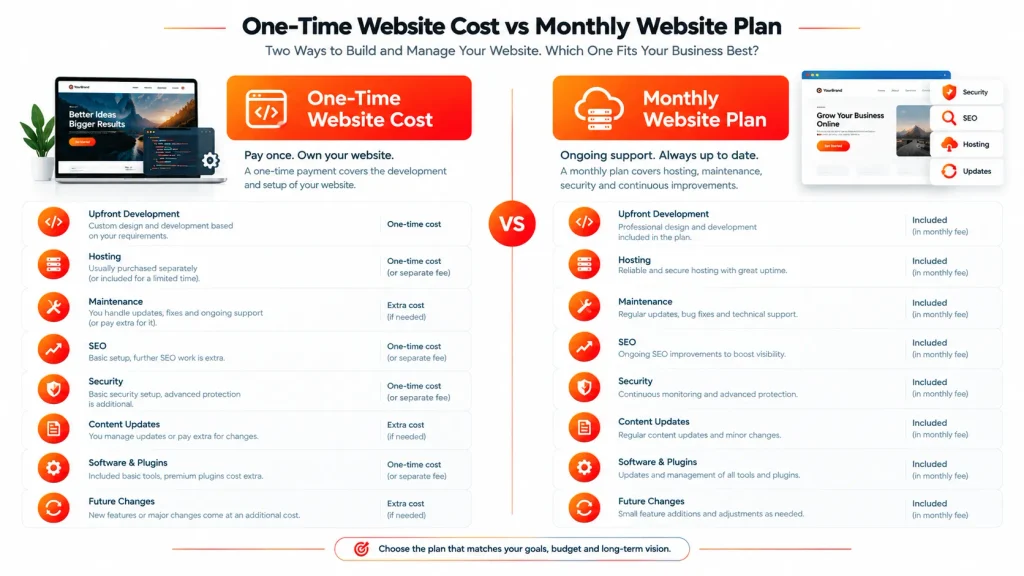
If one company quotes $2,000 and another quotes $7,000, or one asks for $2,500 upfront while another offers a $499 monthly plan, don’t compare only the numbers. A lower quote may simply include less work, while a higher one may include services others charge separately.
With a one-time payment, you may still pay separately for hosting, maintenance, SEO, security, content updates, software, and future changes. A managed monthly plan may bundle these into one recurring cost, which makes budgeting easier, but check whether there’s a setup fee, contract period, or extra charge for custom work.
Build a simple scope comparison covering custom design, number of pages, mobile optimization, booking, payments, memberships, SEO setup, content, hosting, maintenance, integrations, analytics, revisions, and post-launch support. Ask each provider for a written scope of work, deliverables, timeline, payment terms, recurring charges, and ownership details.
The best comparison is the expected total cost over the period you plan to use the service.
What Should You Ask a Car Wash Website Development Company?
- Is the design custom or template-based, and how many pages are included?
- Are mobile optimization, SEO, content writing, and hosting included?
- Who owns the domain and website after launch?
- Are booking, payment, and membership features included?
- What third-party software is required, and what are the recurring costs?
- How many revisions are included, and what is the timeline?
- Who handles maintenance, and will I have administrator access?
- What happens if I cancel the service?
- Are there setup fees or extra charges for future updates?
Common Mistakes to Avoid When Building a Car Wash Website
- Choosing the cheapest quote without comparing scope. A low price isn’t useful if important features, hosting, or support are excluded.
- Hiding prices. Making customers call for basic pricing creates unnecessary friction and sends them to competitors.
- Ignoring mobile users. Local service discovery often happens on smartphones, so the site must load fast and be easy to tap.
- Adding too many features. Start with the functionality that solves the main customer problem, then expand.
- Forgetting maintenance. Websites need software updates, security checks, backups, and occasional technical work.
- Treating SEO as an afterthought. Local SEO should shape structure, content, and location pages from the beginning.
- Not planning for cancellations. Define cancellation, rescheduling, refund, and no-show policies before launching online booking.
How to Reduce Car Wash Website Development Costs
Start with essentials:
Services, pricing, location, hours, contact information, reviews, and clear calls-to-action.
Use existing tools:
Third-party booking, payment, CRM, and membership solutions reduce custom development.
Prepare content early:
Have your logo, service descriptions, pricing, photos, business information, and policies ready before development begins.
Build in phases:
- Phase 1: Website, services, pricing, location, contact
- Phase 2: Booking and payments
- Phase 3: Memberships and customer accounts
- Phase 4: Multiple locations and advanced integrations
Phasing protects your budget because you don’t pay for advanced functionality before you know it’s necessary, and it lets you improve the website based on real usage.
How to Measure Car Wash Website Performance
Traffic alone doesn’t show whether the site is helping the business. Track phone calls, contact forms, booking requests, completed bookings, membership sign-ups, gift-card purchases, directions clicks, quote requests, and website-generated revenue.
For a marketplace, also track customer and provider registrations, average booking value, repeat bookings, commission revenue, provider activity, and booking completion rates. These metrics show conversion, customer acquisition, and retention more clearly than traffic numbers.
Build a Car Wash Website Around Your Business Goals
The right car wash website is rarely the one with the most features. It’s the one that helps the right customers find you, trust you, and take the next step, whether that’s calling, booking, or buying a membership.
At Daigency, we help car wash businesses plan and build websites around their actual requirements, from professional informational sites to advanced booking and membership platforms. Our services include UI/UX design, custom car wash website development, CMS and WordPress setup, online booking and payment integration, CRM/POS integration, and local SEO.
Ready to plan your car wash website?
Tell us your goals, features, and budget, and we’ll help you plan the right solution.
Final Thoughts:
The car wash website cost in 2026 depends less on page count and more on what you expect the website to do.
A small single-location business may only need a professional, mobile-friendly site with services, prices, reviews, hours, location, and contact options. A growing business may need booking, payments, memberships, gift cards, and multiple location pages. A mobile car wash may require location-based services, scheduling, and provider availability. A marketplace needs a much larger system with customer accounts, provider profiles, bookings, payments, commissions, dashboards, and administration.
Start by defining the core customer journey: what should a visitor be able to do on your website? If the answer is “find us and call us,” you probably don’t need a complex platform. If it’s “compare services, book, pay, manage a membership, and receive updates,” you’ll need more advanced functionality and a larger budget.
The goal isn’t to build the most expensive website. It’s to make a sensible investment that supports your current needs and can scale as the business grows. Start with what customers actually need, keep the experience simple, and add functionality when the business is ready.
FAQs - Car Wash Web Cost
- How much does a car wash website cost in 2026?A basic website can range from a few hundred dollars for DIY to several thousand for professional development. Websites with online booking, memberships, payments, integrations, and multiple locations can reach $10,000–$30,000+ depending on scope.
- What is the cheapest way to build a car wash website?A DIY website builder or WordPress setup is usually the lowest-cost starting point. Consider the full budget, including hosting, themes, plugins, booking software, payment processing, maintenance, and the time you'll spend managing the site.
- How much does it cost to add online booking?It depends on whether you use an existing booking platform or build a custom system. Payments, availability management, reminders, cancellations, multiple locations, customer accounts, and integrations can all increase the cost.
- How long does it take to build?A simple business website may take a few weeks. A custom website with booking, payments, memberships, integrations, or multiple locations can take considerably longer.
- WordPress or custom development?WordPress suits standard business requirements and gradual growth. Custom development gives more control for specialized workflows, complex API integrations, advanced booking, or marketplace functionality.
- What pages should a car wash website have?Start with Home, About, Services, Pricing, Location, Contact, Reviews, and FAQ. Add membership, booking, detailing, gift-card, fleet, promotion, blog, or additional location pages when they support your business.
- What is the most important feature?No single feature works for every car wash. Make your services, prices, hours, location, and next action easy to find first, then add booking, memberships, or payments based on your business model and customer demand.