
Quick Answer: Most car wash apps built by a US or Canadian development team cost between $25,000 and $430,000+ in 2026. A simple booking app sits at the lower end, while a full on-demand platform with live GPS tracking, subscriptions, fleet tools, and multiple dashboards can reach the top of that range. Working with a nearshore team in Latin America or Eastern Europe can lower these figures by roughly 30-50%, often with similar time-zone overlap and fewer communication gaps.
That convenience is why on-demand car washing keeps growing across the US and Canada. Apps such as Spiffy, Washos, MobileWash, and Wype have already taught customers to book a wash online. It is also why founders and car wash owners keep asking the same question: how much does it really cost to build a car wash app?
Market Size:
The global car wash apps market was valued at around USD 1.51 billion in 2025 and is projected to reach USD 4.36 billion by 2034, growing at a CAGR of 12.53% from 2026 to 2034.
Before investing in a mobile app, it’s also worth understanding the cost of building a strong online presence. See our guide on How Much Does a Car Wash Website Development Cost to compare website costs, features, and development options.
Is a Car Wash App Worth the Investment in2026?
For many businesses, yes, when the model, market, and budget are planned carefully. Suppose you invest around $70,000 in a mid-range app. If the platform brings additional bookings, moves customers into subscription plans, and helps you win fleet contracts, those revenue streams can steadily recover the investment.
The goal is not to spend as much as possible. Launch a practical version, learn from your first customers, and expand based on real demand.
This guide explains car wash app development cost in plain terms. We will cover where your money goes, which features to build first, what hidden costs to plan for, and how to launch without overspending.
Quick Overview- Car Wash App Development Cost Breakdown in 2026
| App Level | What’s Included | Estimated Cost* | Timeline |
|---|---|---|---|
| Basic MVP | Sign-up, service list, booking, payments, push notifications, simple admin panel | $25,000 – $55,000 | 2-4 months |
| Mid-Level App | Customer + washer apps, GPS tracking, ratings, coupons, iOS & Android | $60,000 – $140,000 | 4-7 months |
| Advanced Platform | Subscriptions, dynamic pricing, analytics, loyalty programs, multi-city support | $160,000 – $290,000 | 6-9 months |
| Enterprise / Fleet Platform | Everything above plus corporate fleet portal, route optimization, multi-location management | $300,000 – $430,000+ | 8-12 months |
Based on typical US and Canadian agency rates. Nearshore teams (Latin America, Eastern Europe) generally charge 30-50% less for similar scope.
You may notice that different websites quote different prices for car wash app development. That is normal, because every company includes different services in its estimate. One may quote only the customer app, while another includes the washer app, admin panel, testing, deployment, and support. Before accepting any quote, always ask exactly what is included. A lower price does not always mean the same product.
What Is an On-Demand Car Wash App?
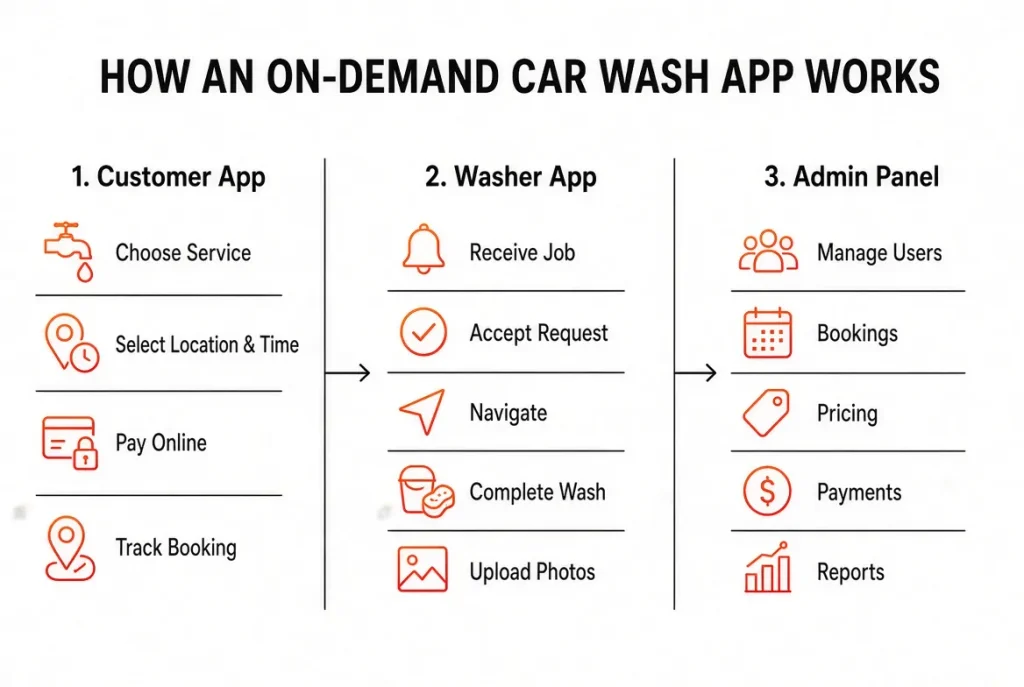
An on-demand car wash app connects car owners with washers, detailers, or car wash providers. A customer picks a service, selects a location and time, and pays through the app. Depending on the business model, the washer travels to the customer, or the customer visits a nearby service center.
An on-demand service usually works as a three-part system:
- Customer app: booking services, making payments, viewing booking details, and tracking the order
- Washer (detailer) app: receiving jobs, viewing customer information, navigating to the location, and completing services
- Admin panel: managing customers, providers, pricing, payments, bookings, and reports
Each part needs its own functions and user experience, which is one of the main reasons cost rises as you add users, screens, and features.
Quick Overview
Real Example: It is Saturday morning, your car is covered in dust, and the nearest car wash has a 40-minute line. Instead of waiting, you open an app, choose a service, pick a time, and a professional washer arrives at your driveway or office parking lot while you carry on with your day.
Choose Your Business Model First
Your business model has a major effect on your budget, so decide how your service will work before asking anyone for a quote.
- On-demand mobile car wash app
Think “Uber for car washing.” A washer travels to the customer. This model usually needs live GPS, booking management, dispatching, and separate customer, washer, and admin systems.
- Marketplace (aggregator) app
Independent washers or car wash stations join your platform, and you earn a commission on each booking. It can cost less than a fully managed model, though vendor onboarding and payouts still require work.
- Single-brand app
Built for your own car wash business. Customers book time slots, pay online, and collect loyalty points. Because you manage your own staff and locations, it is usually the simplest to build.
- Subscription or membership app
Focused on regular customers who want scheduled or unlimited washes. It needs recurring payments, membership management, and sometimes QR codes or license-plate recognition for automated locations.
A simple question helps you choose: who provides the service, and who owns the customer relationship? Your answer usually makes the right model clear.
Not Sure How Much Your App Will Cost?
Get a custom development plan and itemized cost estimate based on your features and business model.
Key Features of a Car Wash App
Customer app
Customers want to book quickly, so keep this side simple.
- Sign-up and login using email, phone, or social accounts
- Vehicle profile with make, model, and plate number
- Service and package selection with clear prices
- Location, date, and time booking
- Secure in-app payments with cards and digital wallets
- Order tracking, booking history, and quick rebooking
- Ratings, reviews, and push notifications
These essentials give customers everything they need for basic online booking without making the app hard to use.
Washer (partner) app
The washer app helps service providers manage their daily work.
- Registration and document verification
- Availability toggle and service area setup
- Accept or reject job requests
- Navigation to the customer’s location
- Before-and-after photo upload
- Earnings and payout history
For an early-stage startup, keeping this side simple helps control the initial cost.
Admin panel
The admin panel gives the business owner control over the platform.
- Washer and customer management
- Service, pricing, and commission control
- Booking and payment tracking
- Reports and analytics
- Review moderation and complaint handling
Advanced Features That Make Your App Stand Out
Once the basics work, add advanced features based on what your customers and washers actually need.
- Real-time GPS tracking: Customers see the washer’s location on a map, like a food delivery app.
- Dynamic pricing: Prices adjust to demand, weather, location, or time of day.
- Subscriptions and memberships: Customers pay regularly for scheduled or unlimited washes.
- Route optimization: Nearby bookings go to the same washer to reduce travel time.
- Heat map view: Shows busy areas and popular booking times.
- In-app chat or calling: Customers contact washers without sharing personal phone numbers.
- Loyalty points and referral rewards: Encourage repeat bookings and word of mouth.
- Fleet or corporate accounts: Businesses manage multiple vehicles and receive one invoice.
- Eco-friendly and waterless options: Appeal to environmentally conscious customers.
Feature-by-Feature Cost Breakdown – 2026
Every feature takes development time, and development time is the biggest part of your final cost.
| Feature | Approx. Cost |
|---|---|
| User registration and login | $3,000 – $7,000 |
| Booking and scheduling | $8,000 – $18,000 |
| Payment gateway (Stripe, PayPal, Apple Pay) | $8,000 – $25,000 |
| Push notifications and SMS | $4,000 – $12,000 |
| Ratings and reviews | $3,000 – $11,000 |
| Real-time GPS tracking | $10,000 – $35,000 |
| In-app chat | $5,000 – $12,000 |
| Washer app (iOS + Android) | $20,000 – $45,000 |
| Admin dashboard | $12,000 – $28,000 |
| Subscriptions and loyalty | $10,000 – $22,000 |
| Dynamic pricing engine | $13,000 – $39,000 |
| Fleet corporate portal (B2B) | $22,000 – $45,000 |
| Route optimization | $25,000 – $50,000 |
You do not need every feature on day one. Start with what customers need most, then add more as the business grows. This keeps your budget under control and shows you what users actually want.
Cost by Development Stage
| Stage | Estimated Cost |
|---|---|
| Discovery and planning | $3,000 – $10,000 |
| UI/UX design | $5,000 – $20,000 |
| Front-end and back-end development | $25,000 – $120,000+ |
| APIs and integrations | $5,000 – $25,000 |
| Testing and QA | $5,000 – $20,000 |
| Launch and deployment | $3,000 – $12,000 |
Testing usually adds around 15-20% to the development budget, and it is not the place to save money. A problem with payments, bookings, GPS, or customer accounts quickly damages user trust.
What Affects Car Wash App Development Cost?
The affects car wash app development cost are following:
1. Features and complexity
A simple “book and pay” app can be built in a few weeks. Add live tracking, chat, dynamic pricing, subscriptions, loyalty programs, and analytics, and development time grows significantly.
2. Number of apps and panels
An on-demand model normally needs a customer app, a washer app, and an admin dashboard. A single-brand business may need only one customer-facing app and a smaller admin panel, which means fewer hours and a lower cost.
3. Platform choice
- Native (separate iOS and Android apps): Strong platform-specific performance, but usually more expensive.
- Cross-platform (Flutter or React Native): One codebase for both platforms, which can save roughly 25-40% on some projects.
- Single platform first: A practical way to test your idea before investing in both.
For many startups, cross-platform is a good balance of cost, speed, and reach.
4. UI/UX design
A template-based design may cost $5,000-$10,000 with a US or Canadian team, while a fully custom interface with animations, branded graphics, and detailed user flows can reach $20,000 or more. Good design is not just about looks. The main booking flow should be short and clear so customers can book a wash without confusion.
5. Team location
Hourly rates vary widely depending on where your developers are based.
| Region | Approx. Hourly Rate |
|---|---|
| USA / Canada | $100 – $200 (senior agencies up to $250) |
| Western Europe | $60 – $130 |
| Eastern Europe | $40 – $90 |
| Latin America (nearshore) | $40 – $80 |
A lower rate can offer good value when the team has relevant experience, clear communication, a strong portfolio, and reliable post-launch support. Choosing a partner only because they are cheapest, however, often creates problems later. A US or Canadian team gives you overlapping time zones, easier contract enforcement, and familiarity with local payment and privacy rules, which matters for a service that visits people’s homes. Latin American teams offer a middle path, since they work in time zones similar to North America.
6. Third-party integrations
Google Maps, payment gateways, SMS, email, and analytics tools speed up development, but many charge monthly or usage-based fees. Include these in your long-term budget.
7. Backend and infrastructure
A Firebase-based backend is faster and cheaper for an early-stage app. A custom backend using Node.js, Django, or Ruby on Rails on AWS or Google Cloud costs more upfront but gives you more control as the platform grows.

For example, a mid-level on-demand car wash app may take around 1,200 development hours. At $100 per hour, that is about $120,000. At $150 per hour, it is about $180,000. With a nearshore team at $60 per hour, the same scope would cost around $72,000. This is why you should compare quotes by hours, scope, features, and deliverables, not just the final price.
A Simple Formula to Estimate Your Budget
Total Cost = Development Hours x Hourly Rate
Recommended Technology Stack
| Part | Common Options |
|---|---|
| Mobile app | Flutter, React Native, Swift, Kotlin |
| Backend | Node.js, Python (Django), Ruby on Rails |
| Database | PostgreSQL, MongoDB, MySQL, Firebase |
| Cloud hosting | AWS, Google Cloud, Microsoft Azure |
| Maps and tracking | Google Maps API, Mapbox |
| Payments | Stripe, PayPal, Braintree, Apple Pay |
| Notifications and SMS | Firebase Cloud Messaging, Twilio |
The right stack depends on your project size, budget, team, and future plans. The best choice is not the newest technology but the one that fits your business.
Ongoing Hidden Costs of Running a Car Wash App
The development quote is not the full cost of running an app. Also plan for:
- Maintenance and updates: Around 15-20% of the original build cost each year for bug fixes, OS updates, and security improvements
- Cloud hosting and servers: Small at first, growing with your customer base
- App store fees: Apple charges $99 per year, and Google charges a one-time $25 registration fee
- Payment processing: Typically around 2.9% plus $0.30 per card transaction with providers like Stripe (check current rates)
- Third-party usage fees: Maps, SMS, email, and analytics
- Marketing and user acquisition: A good app still needs customers
- Legal documents: Privacy policy, terms of service, and payment compliance
- Customer support tools or staff
Rule of thumb: Keep 20-30% of your total budget available for post-launch expenses.
Planning a Car Wash App?
Tell us your requirements and get a clear, feature-by-feature estimate before development begins.
Compliance and Legal Costs in the USA and Canada
If you plan to launch in the US or Canada, build legal and compliance requirements into your plan from the start.
- Washer background checks: Washers may enter private property, so screening matters. Services such as Checkr or Sterling handle identity, criminal, and driving record checks. Integration may add roughly $5,000-$12,000.
- Insurance: Depending on your structure and location, you may need general liability coverage, workers’ compensation where applicable, and commercial auto coverage for washers’ vehicles. Your terms should clearly state who is responsible for vehicle damage.
- Worker classification: Laws such as California’s AB5 can determine whether washers are employees or independent contractors. Speak with a qualified lawyer before deciding.
- Payment security: Card payments involve PCI-DSS requirements. A reputable provider such as Stripe simplifies much of this.
- Data privacy: Depending on where your customers live, consider CCPA in California, PIPEDA in Canada, or GDPR if you serve European users.
- Water runoff rules: Many cities and states restrict where car wash wastewater can go. Waterless and low-water methods can help you comply.
This is general information, not legal advice. Consult an attorney in your state or province.
How Long Does Development Take?
| Stage | Typical Duration |
|---|---|
| Discovery and design | 3-6 weeks |
| Development | 2-6 months |
| Testing and fixes | 3-5 weeks |
| Launch and store approval | 1-2 weeks |
A basic MVP can be ready in 2-4 months, a complete on-demand platform in 6-9 months, and an enterprise fleet solution in 8-12 months. Timelines depend on features, platforms, integrations, team size, and how quickly you give feedback and approvals.
Step-by-Step Development Process – 8 ways Complete Guideline
- Market research: Study competitors, customer needs, and local demand.
- Choose your business model: Decide between a single-brand app, marketplace, or on-demand service.
- Plan features: Separate essential features from those that can wait.
- Design the UI/UX: Start with wireframes, then build final screens.
- Development: Build the customer app, washer app, backend, and admin panel.
- Testing: Check payments, location accuracy, security, performance, bookings, and different devices.
- Launch: Start in one city or service area and expand gradually.
- Maintain and improve: Use real customer feedback to guide updates.
How Does a Car Wash App Make Money?
Understanding revenue helps you decide how much to invest.
- Commission per booking: A percentage of each completed wash
- Subscription plans: Monthly payments for scheduled or unlimited washes
- Fleet and corporate contracts: Businesses pay for regular vehicle cleaning
- Premium add-ons: Interior detailing, waxing, and ceramic coating raise order value
- Featured listings: Providers pay for extra visibility
- Surge pricing: Higher prices during busy periods
- Partnerships and advertising: Work with tire shops, auto parts stores, and car-care brands
- Product sales: Car-care kits, wax, and accessories
Subscriptions and fleet contracts provide recurring revenue, and traditional car washes across North America have increasingly adopted memberships to keep customers coming back.
Learn From Existing Apps
- Spiffy: Combines car washes with services like oil changes and tire inflation, showing the value of offering multiple services to existing customers.
- Washos: Focuses on mobile detailing, corporate customers, and waterless washing.
- Wype: Concentrates on corporate fleets, which creates recurring business relationships.
- MobileWash: Shows how a marketplace model can connect customers with vetted washers across multiple locations.
Studying these apps shows what customers already expect and where gaps remain.
Which Markets Offer the Most Opportunity?
The US and Canada combine high car ownership with strong demand for convenience services, although competition can be intense in large metro areas. Suburban neighborhoods, busy commuter cities, and regions with harsh winters, where road salt and grime build up quickly, are especially promising. Whichever market you choose, validate local demand, competition, pricing, and washer availability before building.
Car Wash App Trends to Watch in 2026
- AI personalization: Suggesting services based on history, vehicle, and location
- Memberships: Regular car-care plans that build recurring revenue
- Eco-friendly washing: Tracking water savings and offering waterless options
- IoT and license-plate recognition: Supporting automated tunnel washes and faster entry
- Fleet and B2B services: Corporate vehicle cleaning as a major revenue channel
- Digital wallets: Apple Pay and Google Pay are now standard expectations
You do not need every new technology at launch. Build a solid foundation that lets you add useful features later.
Freelancer vs. In-House Team vs. Development Company
- Freelancers: Usually the cheapest, but complex projects become risky if one person leaves or lacks availability.
- In-house team: Gives you direct control, but salaries, benefits, software, and recruitment make it the most expensive route.
- Development company: Provides design, mobile development, backend, testing, and support under one team. It costs more than a freelancer but makes larger projects easier to manage.
Custom App vs. White-Label Solution
A white-label solution is a ready-made app that launches faster and costs less at the start, often $100 to $1,000+ per month depending on the provider and features. The drawback is limited customization, and the fees continue as you grow.
A custom app needs a larger upfront investment but gives you full control over design, features, customer experience, and scalability. Over several years, custom can make better financial sense for a growing business.
9 Smart Ways to Reduce Car Wash App Development Cost
- Start with an MVP. Launch with booking, payments, notifications, and an admin panel.
- Go cross-platform. Flutter or React Native reduces work when you need iOS and Android.
- Pick one platform first if your audience clearly prefers one.
- Use ready-made services like Stripe, Google Maps, and Firebase.
- Write clear requirements. Mid-project changes quickly inflate budgets.
- Fix the scope in writing with a milestone-based agreement.
- Launch in one city and test your model before expanding.
- Talk to fleet buyers early. A few pilot customers show which fleet features are truly needed.
- Choose your team wisely, not just cheaply. A very low quote can lead to expensive rework.
Common Mistakes that Waste Money
Building every feature before testing the idea, ignoring the washer app, skipping proper testing, spending the whole budget on development with nothing left for marketing, and not planning for support and maintenance. A successful app does not need to be complicated from day one. It needs to solve a real problem and deliver a reliable experience for customers and washers.
How to Choose the Right Development Partner
Before signing, check whether the team:
- Has built on-demand or booking apps and can show real examples
- Provides an itemized estimate instead of one large number
- Explains what the quote includes: design, testing, admin panel, deployment, and support
- Confirms that you will own the source code
- Offers post-launch support and updates
- Takes payment security and data protection seriously
- Has genuine reviews on Clutch, G2, or Google
Get at least three quotes and ask each company the same questions. A reliable team will also tell you which features you can delay or remove. That kind of honest conversation helps protect your budget.
Daigency can help you define the right features, design a simple user experience, and build a practical plan around your budget. A successful car wash business needs more than just great service it needs a strong digital presence. It helps businesses build professional and custom mobile apps that make booking easier and support growth.
Build Your Car Wash App with Daigency
From UI/UX design and mobile development to backend, testing, and launch, our team can help you build a complete solution around your budget.
Final Thoughts
Car wash app development cost depends on what you build, how you build it, and who builds it. A lean MVP can start around $30,000-$70,000, while a complete on-demand platform with advanced features and fleet tools can reach several hundred thousand dollars.
You do not need every feature on day one. Start with what your customers truly need, create a simple booking experience, keep part of your budget for maintenance and compliance, and invest more once you have real customer feedback. Start small, validate the idea, and grow from there.
FAQs - Car Wash App Cost
- How much does it cost to build a car wash app in the USA or Canada?Most projects cost between $25,000 and $430,000+. A basic MVP runs about $25,000-$55,000, a mid-level app $60,000-$140,000, and advanced or enterprise platforms $160,000-$430,000 or more.
- How long does it take to develop a car wash app?A basic MVP takes about 2-4 months, a mid-level app 4-7 months, and an advanced or enterprise platform 6-12 months.
- Which features should I build first?Sign-up, service selection, booking, secure payments, notifications, and an admin panel. Add GPS tracking, subscriptions, loyalty programs, and dynamic pricing later.
- Can I build one app for both iOS and Android?Yes. Flutter and React Native let developers build for both platforms from a shared codebase, which often reduces time and cost.
- What is the yearly maintenance cost?Typically 15-20% of the original development cost, depending on app size, users, infrastructure, and security needs.
- Can I build a car wash app for under $30,000?Yes, with templates, no-code platforms, or white-label solutions, but you will have fewer customization options and may hit limits as you scale.
- How do car wash apps make money?Through booking commissions, subscription plans, fleet contracts, premium services, featured listings, advertising, partnerships, and product sales.
- Are washers employees or contractors?It depends on your state or province and how much control you have over their work. Classification rules are complicated, so get legal advice first.
- Is a background check really necessary?It is strongly recommended. Background checks protect customers, reduce business risk, and build trust when washers visit homes and workplaces.