Choosing the right website builder can be confusing, especially if you are new to website building in 2026.
Wix vs wordpress vs squarespace for beginners, when comparing you will find that all three platforms can help you create a professional website, but they work in different ways.
Wix is known for its easy drag-and-drop editor and beginner-friendly setup. Squarespace is popular for clean website templates and modern designs. WordPress gives you more control over themes, plugins, hosting, SEO, and website customization.
What are the top 3 website builders?
For this comparison, the top three are Wix, Squarespace, and WordPress. Wix focuses on simplicity, Squarespace focuses on design, and WordPress focuses on flexibility and control. The best platform depends on your budget, technical skills, website type, and future goals. You do not need the platform with the most features. You need the one that fits your actual needs.
In this guide, we will compare Wix vs Squarespace vs WordPress for ease of use, design, ecommerce, SEO, blogging, pricing, plugins, performance, and more.
Wix vs Squarespace vs WordPress: Quick Comparison
| Feature | Wix | Squarespace | WordPress |
| Ease of use | Very easy | Easy | Moderate |
| Design | Flexible | Modern and clean | Highly customizable |
| SEO | Good | Good | Excellent with plugins |
| Ecommerce | Good | Good | Excellent with WooCommerce |
| Blogging | Good | Good | Excellent |
| Apps/Plugins | Wix App Market | Extensions | Large plugin library |
| Customization | Good | Good | Very high |
| Best for | Beginners and small businesses | Creatives and portfolios | Bloggers and growing businesses |
Wix is a good choice if you want a simple website builder. Squarespace works well for people who care about design, while WordPress is better for users who want more control and flexibility.
Our Experience
We tested, Wix feels easier when you want to build a website quickly, while Squarespace makes it simple to create a polished design. WordPress takes more time to set up, but it gives you much more control over SEO, plugins, content, and customization. This difference becomes more noticeable as your website grows.
Which is easier, Squarespace or Wix or WordPress?
Ease of use is important when you are building your first website. A simple website setup can save you time and help you focus on your business or content.
Wix is one of the easiest platforms for beginners. Its drag-and-drop editor lets you add text, images, buttons, forms, videos, and other elements without coding skills.
Squarespace is also beginner-friendly. Its ready-made website templates give you a professional starting point, and the editor is simple to understand.
WordPress has a bigger learning curve. You may need to learn about themes, plugins, web hosting, updates, and website management. But once you understand the basics, you have much more control.
Which is easier, Squarespace or Wix?
For most beginners, Wix is slightly easier because you can move and edit many website elements directly on the page.
Result Winner: Wix
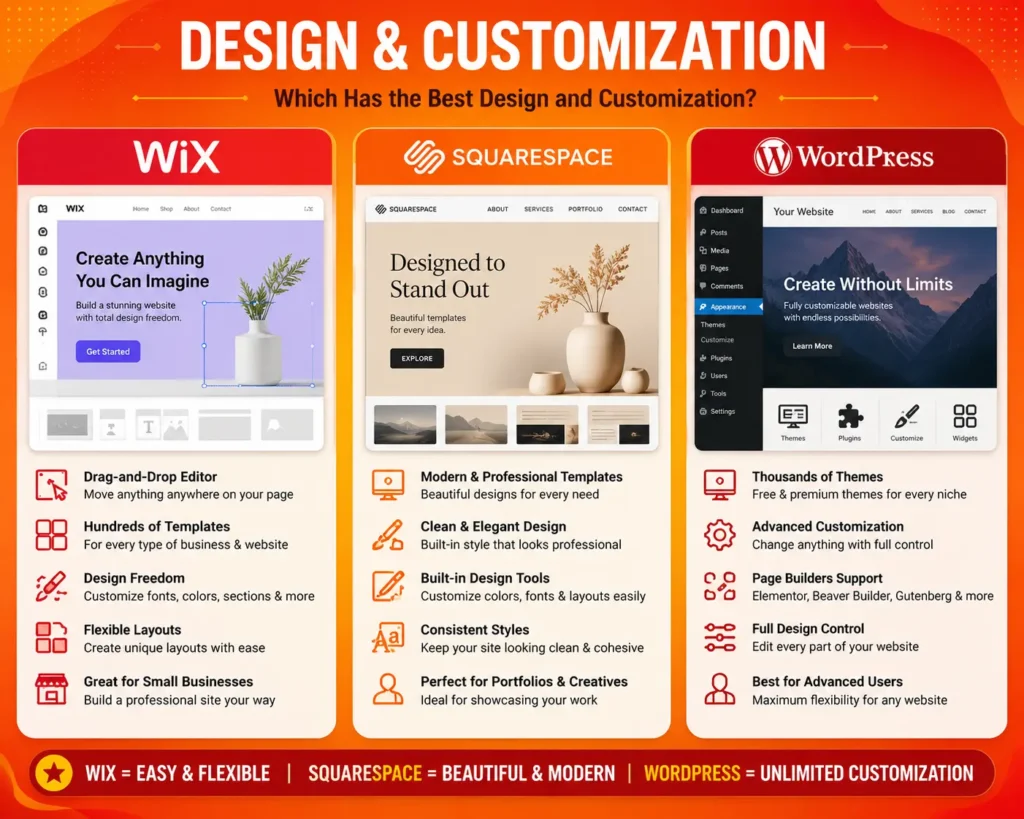
Which Has the Best Design and Customization?
Website design can affect how visitors see your business. A clean layout, useful navigation, good images, and mobile-friendly pages can make a website easier to use.
Wix offers many website templates and gives you a lot of freedom when changing page layouts. It works well for small businesses, freelancers, landing pages, and portfolio websites.
Squarespace is known for its modern and professional templates. It is a popular option for photographers, designers, artists, restaurants, and other creative professionals.
WordPress offers the highest level of customization. You can choose from many themes and use page builders, plugins, custom CSS, and other tools to change the design.
Result Winner: WordPress for flexibility, Squarespace for ready-made design
Which platform is best for a portfolio?
Squarespace is a strong choice if you want a clean and stylish portfolio. Wix is useful when you want more freedom with your page layout, while WordPress is better for advanced customization.
Wix vs squarespace portfolio pricing
When comparing Wix vs squarespace portfolio pricing, do not only look at the monthly price. Also check the templates, storage, domain options, marketing tools, and other features included with the plan.
Which Is Best for Ecommerce?
If you want to sell products online, you need more than a good-looking website. An ecommerce website needs product pages, a shopping cart, payment gateways, inventory management, shipping options, and order tools.
Wix offers built-in ecommerce features on its business plans. It is a practical option for small and medium-sized online stores that want an easier setup.
Squarespace also offers ecommerce tools for selling physical products, digital products, services, and other content. Its design-focused approach can be useful for brands that want an attractive online store.
WordPress becomes a powerful ecommerce platform when you use WooCommerce. It gives you more control over products, payments, shipping, extensions, store design, and other ecommerce features.
Result Winner: WordPress
For a simple online store, Wix or Squarespace may be easier to manage. For a larger store that needs advanced customization, WordPress with WooCommerce offers more flexibility.
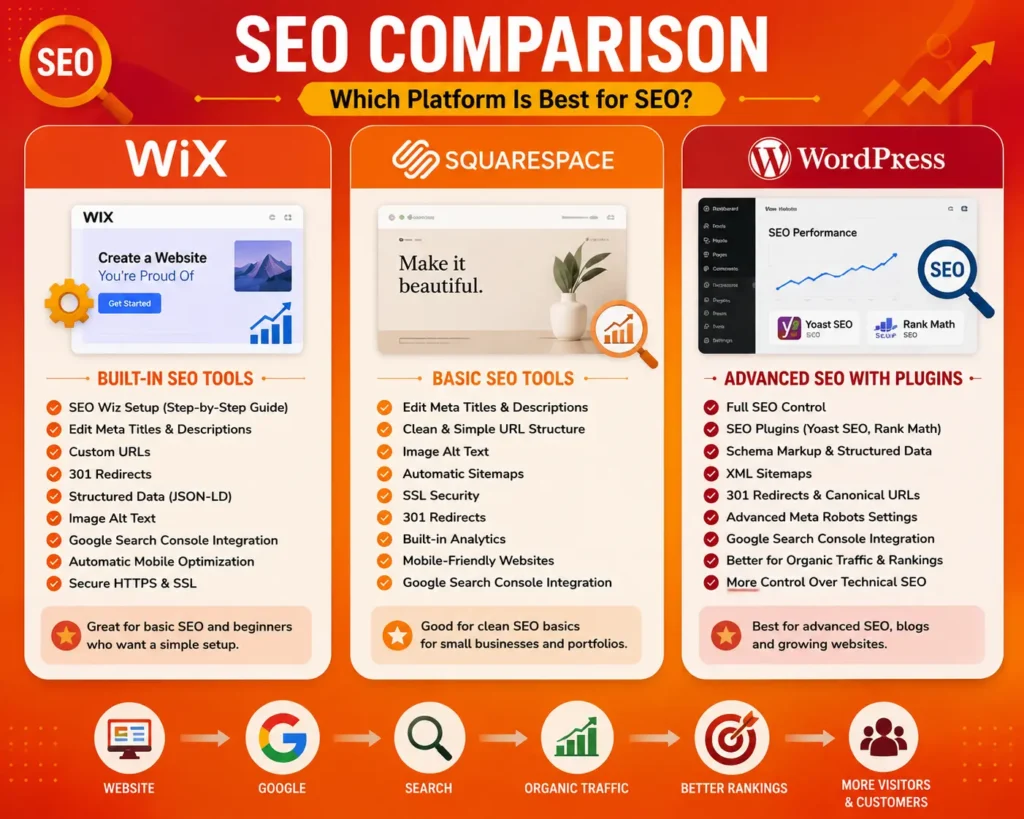
Wix vs WordPress vs Squarespace | Which Is Best for SEO?
SEO (search engine optimization), helps search engines understand your website and can improve your chances of getting organic traffic from Google and other search engines.
Wix includes several built-in SEO tools. You can manage important areas such as page titles, meta descriptions, URLs, redirects, structured data, and other SEO settings. Wix also works with Google Search Console.
Squarespace provides basic SEO features for page titles, descriptions, URLs, images, and other website content. These tools can be enough for many small businesses and portfolio websites.
WordPress gives you more control over technical SEO. You can use plugins such as Yoast SEO and Rank Math to manage SEO settings, XML sitemaps, schema markup, redirects, and content optimization.
Why would anyone use WordPress over Squarespace or Wix from an SEO perspective?
The main reason is control. WordPress gives you more flexibility with technical SEO, content structure, plugins, structured data, and other optimization settings.
Result Winner: WordPress
Wix and Squarespace are good for basic SEO, but WordPress is usually a better choice when you want deeper SEO control.
WordPress vs Wix vs Squarespace for blogging | Which Is Best
A good blogging platform should make it easy to create, organize, and publish content.
Wix is useful for business websites that also have a blog. You can create blog posts, add images, organize content, and share articles with visitors.
Squarespace also has a simple blogging system. Its clean templates can make blog posts look professional, especially for photography, travel, design, and lifestyle content.
WordPress is a strong content management system (CMS) for bloggers. You can organize blog posts with categories and tags, manage a media library, and add plugins for SEO, social sharing, forms, and other features.
If you are comparing WordPress vs Wix vs Squarespace for blogging, WordPress usually comes out ahead because it provides more control over content creation, organization, SEO, and website growth.
Result Winner: WordPress
Which Has the Best Apps, Plugins, and Integrations?
Apps, plugins, and extensions allow you to add new functions to your website.
Wix has the Wix App Market, where you can find tools for bookings, forms, marketing, analytics, ecommerce, communication, and other business needs.
Squarespace provides extensions and third-party integrations that can connect your website with different business and marketing services.
WordPress has a very large plugin ecosystem. You can find plugins for SEO, security, contact forms, analytics, ecommerce, backups, performance, social media, and many other functions.
These plugins can help turn a basic WordPress website into a more advanced business website.
Result Winner: WordPress
Wix and Squarespace are easier if you want fewer technical decisions. WordPress is better when you need more choices and advanced functionality.
Which Is Best for Scalability and Performance?
Your website may start small, but your needs can change as your business grows. This makes scalability an important part of choosing a website platform.
Wix manages hosting and much of the website infrastructure for you. This is useful for people who do not want to deal with technical hosting settings.
Squarespace also provides managed hosting, so you can focus more on your website content and business instead of server management.
WordPress gives you more control over web hosting, caching, images, themes, plugins, and website speed. This can be helpful for growing websites and content-heavy businesses.
However, WordPress requires more website maintenance. Poorly managed plugins, themes, or hosting can affect performance and security.
Result Winner: WordPress for scalability and control
Wix and Squarespace are convenient for smaller websites, while WordPress gives growing websites more flexibility.
Wix vs Squarespace vs WordPress Pricing
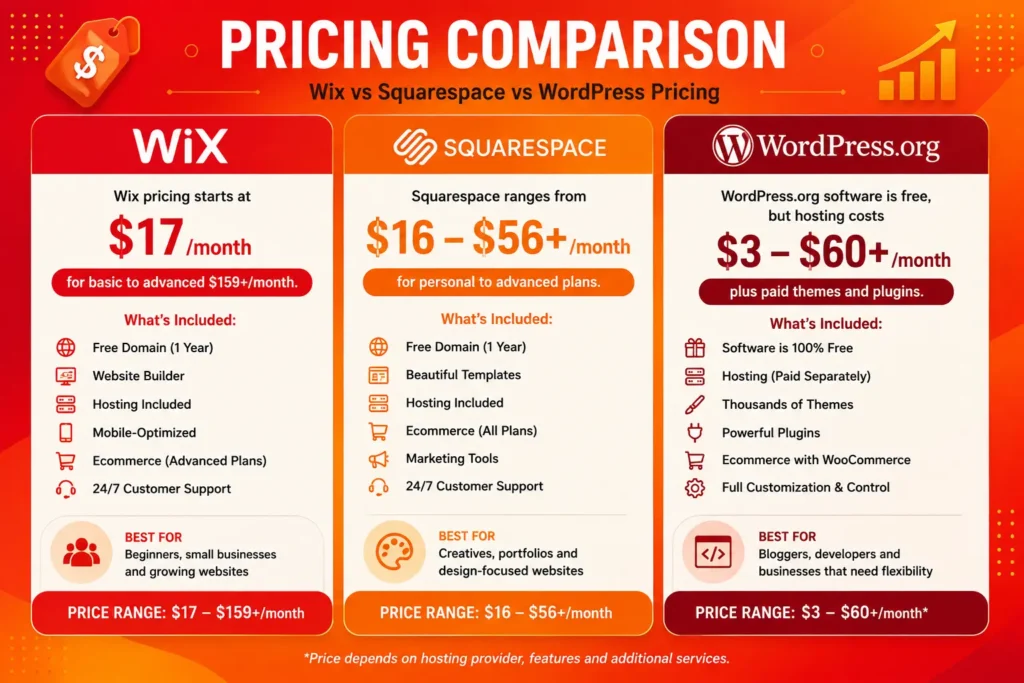
When comparing Wix vs Squarespace vs WordPress pricing, you should look at the total cost of running a website instead of only the monthly plan.
Wix has a free option with limitations and paid plans with additional website and business features. You can also need a paid plan for ecommerce and other advanced functions.
Squarespace uses paid plans that include website hosting and different features based on the plan you choose.
WordPress software is free, but a self-hosted website normally requires a domain name and web hosting. You may also choose premium themes, plugins, security tools, or other services.
Wix vs Squarespace pricing
It is fairly simple to compare because both are hosted platforms. Your plan can include many website features without separately managing a hosting account.
Wix or Squarespace: which is cheaper
If you are asking, the answer depends on the plan and features you need. Compare the yearly cost, domain, ecommerce tools, storage, marketing features, and other extras before making a decision.
WordPress may have a lower software cost, but hosting, domain registration, premium plugins, and themes can increase the final website cost.
Pros and Cons of Wix, Squarespace, and WordPress
Wix
Pros
- Very easy to use
- Beginner-friendly drag-and-drop editor
- Good website templates
- Built-in business tools
- Good basic SEO features
- Ecommerce support
Cons
- Less control than WordPress
- Advanced features may require higher plans
- Some users may find migration difficult
What is the downside to Wix?
The main downside is that Wix gives you less technical control than WordPress. It is convenient, but advanced users may want more freedom.
Squarespace
Pros
- Modern and professional templates
- Easy website management
- Strong choice for portfolios
- Good blogging features
- Ecommerce support
- Useful built-in tools
Cons
- Less customization than WordPress
- Smaller extension ecosystem
- Some advanced features require higher plans
What is a disadvantage of using Squarespace?
The biggest disadvantage is that it can feel limiting if you need advanced customization or many third-party plugins.
WordPress
Pros
- Highly customizable
- Large plugin ecosystem
- Many themes
- Strong blogging tools
- Advanced SEO options
- Good for growing websites
- Works well with WooCommerce
Cons
- Higher learning curve
- Hosting is usually managed separately
- Plugins and themes need regular updates
- Poor management can create performance or security issues
Which Platform Is Best for Different Users?
There is no single website builder that is perfect for everyone. Your website goals should guide your choice.
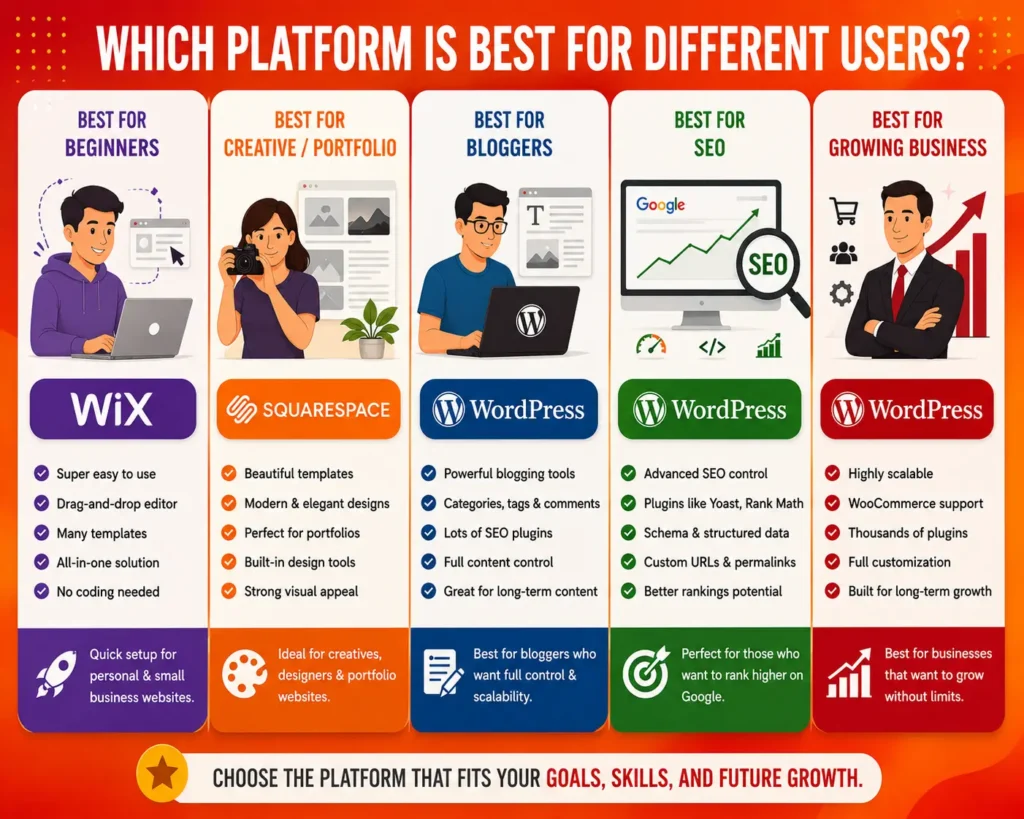
Best for Beginners
Wix is a strong choice if you want to build a website quickly without learning complicated technical settings.
Best for Creative Businesses
Squarespace is a good choice for photographers, designers, artists, and other creative professionals who want professional-looking templates.
Best for Bloggers
WordPress is a better option if publishing content is one of the main goals of your website.
Best for SEO
WordPress is a good choice if you want more control over technical SEO, content optimization, plugins, and search visibility.
Best for Small Businesses
Wix can work well for local businesses, freelancers, and small companies that need a professional website with simple management.
Best for Growing Businesses
WordPress is useful for businesses that expect their website to grow and need more customization, integrations, and content management options.
Why use WordPress instead of Wix?
If you need more control over your website, advanced SEO features, custom functionality, or a large content strategy, WordPress can be a better choice.
Which is best for your website, Squarespace or WordPress?
If you want an easy platform with beautiful templates, Squarespace can be a great option. If you want more flexibility, plugins, SEO control, and long-term customization, WordPress is usually the stronger choice.
Should I switch from Squarespace to Wix?
You may consider switching if you prefer Wix’s editor or need more freedom with page layouts. But if your current Squarespace website works well and meets your needs, there may be no reason to switch.
Conclusion
So, which website builder is best? Wix is best for beginners who want an easy website builder, drag-and-drop editing, and useful business tools.
Squarespace is best for users who care about clean design, professional templates, and simple website management.
WordPress is best for users who want more control over SEO, blogging, plugins, ecommerce, customization, and long-term website growth.
Need Help Building Your Website?
Need help building the right website for your business? At Daigency, we provide professional website development, web design, SEO, and digital marketing services to help businesses build a strong online presence. Whether you need a new business website, an ecommerce store, or better search visibility, our team can help turn your ideas into a website that supports real business growth.
Ready to build a better website? Explore Daigency’s digital solutions today.
Frequently Asked Questions
- Is Squarespace better than WordPress?Squarespace can be better for users who want an easy platform with attractive templates. WordPress is better for users who need more flexibility and control.
- Which is better, Wix Squarespace?Wix is usually better for beginners who want more freedom with the editor. Squarespace is a strong choice for users who want clean and professional website designs.
- Which platform is best for a portfolio?Squarespace is an excellent option for a design-focused portfolio. Wix is useful when you want more layout freedom, while WordPress is better for advanced customization.
- Which is better for SEO, Wix or Squarespace?Both provide useful SEO tools. However, WordPress gives you more control through its settings, themes, and SEO plugins.
- Which platform is best for blogging?WordPress is generally the strongest option for blogging because it provides powerful content management, SEO options, categories, plugins, and room for growth.
- Can I move from Wix or Squarespace to WordPress?Yes. Website migration is possible, but you may need to move or rebuild pages, blog posts, images, URLs, and design elements.
- Which website builder should a beginner choose?For most beginners, Wix is the easiest starting point. Squarespace is also beginner-friendly, while WordPress is better if you are willing to spend more time learning and want greater control.
More Tips to Grow Your Online Presence
Want better visibility and more website traffic? Explore these practical guides to improve SEO, attract customers, and grow your business online.
- Best Free SEO Tools in 2026
- How to Rank Website on Google in 2026
- What Does Local SEO Actually Cost?
- How much does healthcare website development cost in Canada
- Cleaning Website Development Cost in Houston (2026 Pricing, Features & Timeline)
- What Is Web Development and Why It Matters
- Digital Marketing Strategies for Small Businesses in a Low Budget
- How to Start a Nonprofit Organization with No Money
- The Ultimate Colour Guide for 10 Different Industries in 2026
- The Ultimate Guide to Modern App Development in 2026
- How Much Does iOS App Development Cost in 2026?